

Why 'Best AI Agent Shopify Store Management' Still Matters
For merchants the phrase best ai agent shopify store management points to a single goal: reduce repetitive work while keeping control over brand voice, product accuracy and customer experience. In 2026 that balance remains central — AI agents can automate tasks like product tagging, draft copy or simple customer replies, but they are not a hands-off replacement for merchant judgement.
Remember 2025 searches and reviews: many merchants evaluated agents on speed and automation but learned the hard lesson that a generic connection alone does not ensure faithful visuals, clear layouts, accurate reviews or useful internal links. Assessing how an agent integrates with previews, undo, and content relationships (products, collections, articles) is at least as important as raw automation claims.
- Prioritize agents that make it easy to review and undo changes.
- Look for previews that show layout and visual fidelity, not just text.
- Avoid assuming automation equals accurate on-site presentation.
Practical Workflows Where an AI Agent Helps Most
Focus on repeatable workflows that free up your time without introducing risk. Useful examples include batch product descriptions for 1–10 products, SEO-friendly meta content drafts, and generating multiple hero image captions or alt text options. These tasks benefit from templates and small-batch runs so you can review, refine and apply with confidence.
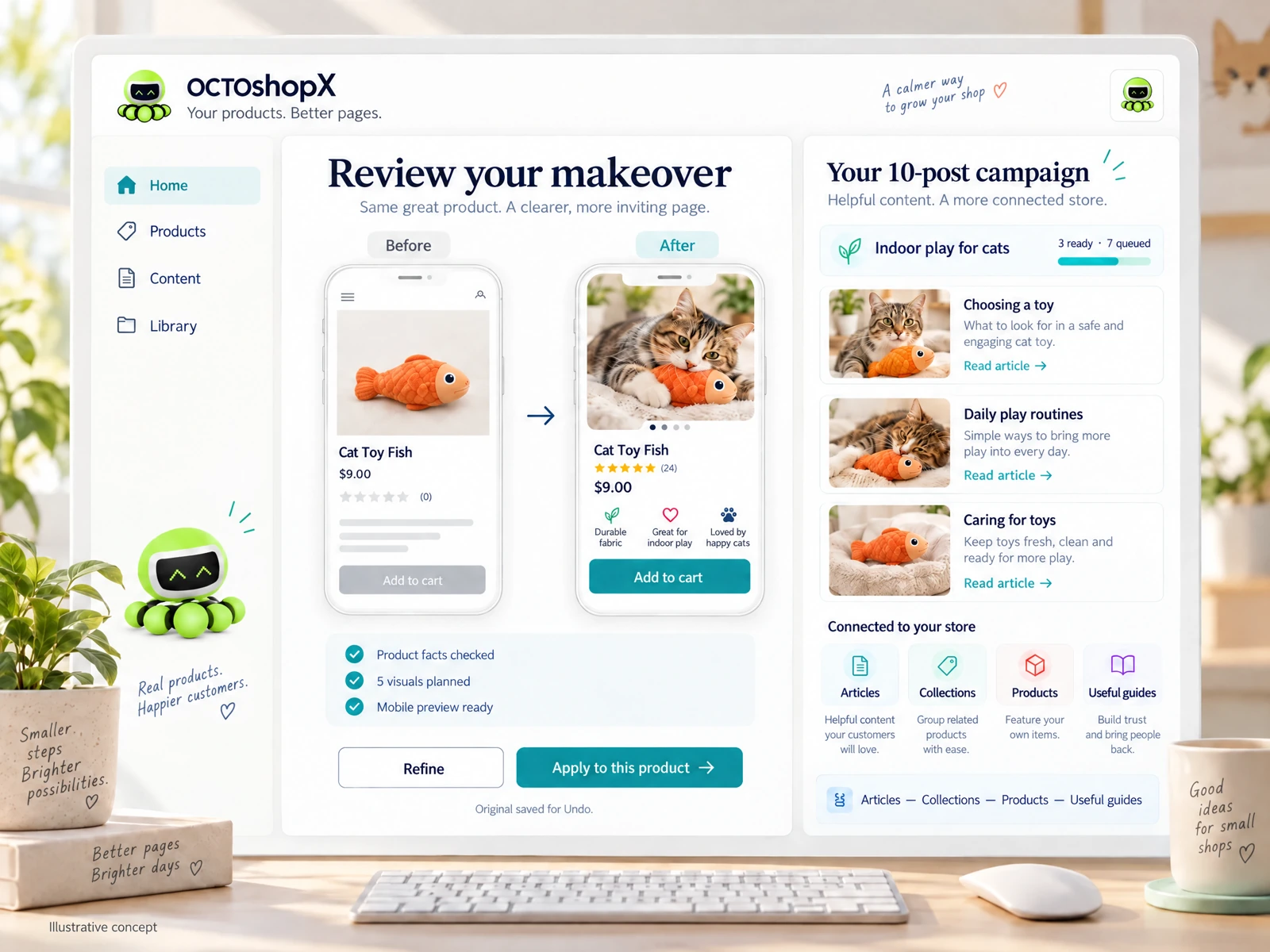
Another high-value workflow is multi-page content campaigns: turn product improvements into linked articles, collection intros, and internal guides. When an agent produces connected content, verify internal links and on-site navigation. A well-designed process should let you preview how a blog post will link to a product or collection before changes go live.
- Batch-update 1–10 products at a time for controlled quality checks.
- Create linked campaigns (products, collections, articles) for discoverability.
- Always preview internal links and navigation before publishing.
Evaluating Visual Fidelity and Layout Reliability
Visuals and layout matter for conversions; an AI agent that only outputs text may improve copy but leave pages looking off-brand. Evaluate agents on how they handle hero images, gallery selections, and caption placement. Importantly, test preview accuracy — does the preview reflect your live theme and spacing?
Also confirm that the agent preserves original assets and offers an easy Undo. A generic connection to your store’s admin does not guarantee useful visual placement or consistent style. Build a short test plan: run 5–10 visuals per page/article in a staging area and verify spacing, aspect ratios and mobile behavior before applying changes to the live store.
- Test 5–10 visuals per page/article to check layout and mobile behavior.
- Ensure originals are saved and Undo is straightforward.
- Verify previews match your live theme, not just a generic mockup.
Accuracy, Governance and Reviewing Outputs
AI agents can hallucinate or introduce incorrect product details; never skip verification. Build a simple governance checklist: fact-check SKU, pricing, shipping notes, materials and variant options. Assign a single reviewer for small runs (1–10 products/pages) to keep style consistent and catch factual errors quickly.
Keep editorial control with clear acceptance criteria. For marketing copy include tone-of-voice rules; for technical specs require sourcing from verified product sheets. The goal is to let the agent handle drafts and repetitive rewrites while people validate facts and final presentation before publishing.
- Use a one-person review for small batches to maintain consistency.
- Create acceptance criteria for factual and stylistic checks.
- Do not publish without verifying SKU, price and shipping info.
Read the connected-content guide or explore product and blog specimens.
Pricing, Licensing and Practical Purchase Decisions
Licensing models vary: some tools charge recurring fees, others offer one-time licenses with optional renewals. Match your decision to expected use: occasional product refreshes and small campaigns often make one-off or limited-run licensing more cost-effective than high-monthly subscriptions. Consider one-year included updates and what continued support costs after that period.
Also budget for image generation or third-party AI costs separately. If your chosen agent offers bundled visuals, verify how many visuals per page/article are included and whether previews are part of the package. For merchants focused on 1–10 product makeovers and a series of blog posts, compare the per-campaign limits rather than raw monthly numbers.
- Compare one-time licenses with renewals to recurring subscription costs.
- Budget separately for image/AI credits where applicable.
- Prioritize packages that include previews and per-run visual allowances.
Choosing and Testing the Right Agent — A 3-Step Merchant Plan
Step 1: Define the top three outcomes you want (example: refreshed product pages, five linked blog posts, improved alt text). Keep scope to 1–10 products/pages to start. Step 2: Run a short trial campaign — request previews, test 5–10 visuals per page, and confirm Undo and original preservation are available. Use that trial to measure how much manual cleanup is required.
Step 3: Evaluate support, update cadence and the product’s approach to connected content (articles, collections, products, useful guides). Don’t assume any single tool is perfect: instead select one that reduces your workload while preserving editorial control and visual fidelity. If a tool offers a one-time license with a year of major updates and support, weigh that against your expected cadence of store updates.
- Start with a narrowly scoped 1–10 product/page campaign.
- Test previews, Undo, and preservation of originals in a trial run.
- Choose a plan that matches your update frequency and support needs.
Can an AI agent fully manage my Shopify store without human review?
No. AI agents can automate drafts and repetitive tasks, but merchants must review factual product details, visuals and internal links. Build a small-batch review workflow to verify accuracy and presentation before publishing.
How many products should I update at once when testing an AI agent?
Start small: 1–10 products or pages per run. This scope keeps review manageable, reveals layout issues, and lets you confirm previews and Undo behavior without risking broad site changes.
What should I test in a trial before buying a licensing plan?
Run a short campaign that exercises previews, 5–10 visuals per page/article, Undo and original asset preservation. Check how the agent handles internal links, mobile layout, and any image budgets or credit usage.
Install OCTOshopX. Give your store one clear job.
Make decisions that protect accuracy and visual quality while automating repetitive tasks. Install OCTOshopX.
A calm Shopify Product & Blog Studio: 5–10 useful visuals, connected articles and products, preview before publishing, and 1-Click Undo when needed.