


Why 2025 matters: legacy context for content decisions
2025 was a turning point for store content: AI writing and image tools became commonplace in merchant toolboxes, and many shops adopted them for product descriptions, blog posts, and simple imagery. That history matters because merchants still search for the best Shopify AI tools 2025 when evaluating tools now—those decisions influenced available templates, typical integrations, and common mistakes you’ll still see in 2026.
Treat the 2025 label as shorthand for a set of capabilities and missteps: faster drafts, variable factual accuracy, and visual outputs that often need human tuning. When you compare tools today, think of 2025-era behavior as a baseline—expect similar strengths (speed, iteration) and recurring weaknesses (hallucinations, layout fidelity) unless the vendor explicitly addresses them.
- Use 2025 comparisons to understand typical feature sets and common pitfalls.
- Expect need for human review: speed isn’t the same as final accuracy.
- Check how the tool manages product-specific facts (size, materials, inventory).
What merchants actually need from AI content tools
Merchants want three practical outcomes: faster content that still converts, consistent brand voice across products and posts, and visuals that fit your store’s layout without awkward cropping or mismatched styles. Prioritize tools that produce editable drafts and let you lock brand tone or key product facts.
In practice, that means a workflow where AI produces a base draft, you verify product facts and compliance, then refine voice and layout before publishing. For imagery, ensure the AI’s output can be previewed in your theme and adjusted for aspect ratio and clarity—generic connection alone won’t guarantee faithful visuals or useful internal links.
- Require editable outputs and easy Undo/restore of originals.
- Build a verification step for product specs and pricing.
- Preview visuals in your theme before applying them live.
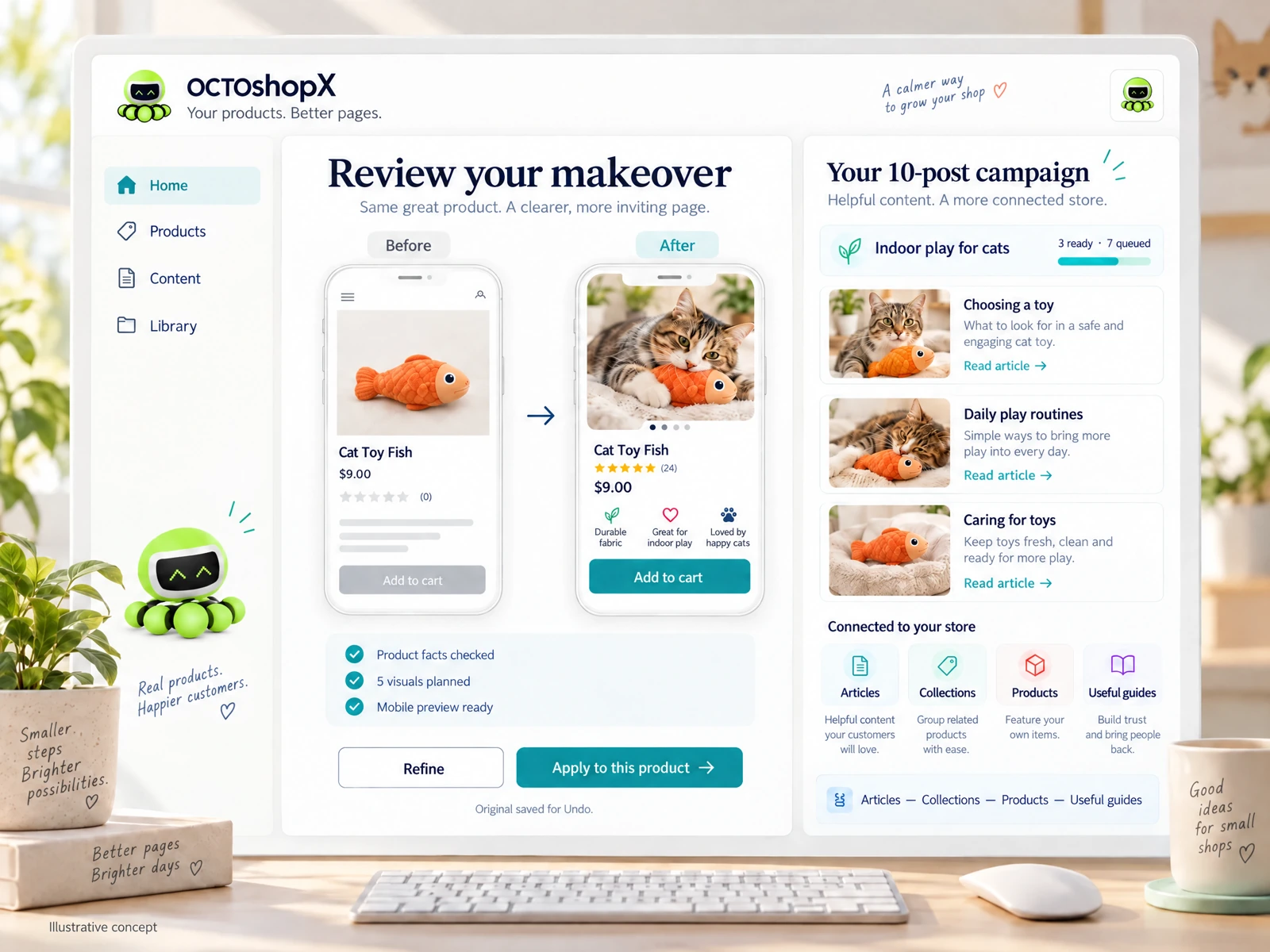
Comparing strengths: copy, SEO, and batch blogging
Some tools shine at short-form product copy with consistent tone; others focus on batch blog production or SEO scaffolding. For shops with a handful of hero products, prioritizing quality over quantity yields better conversion. For content-heavy stores, look for batch options that let you review and edit multiple posts before publishing.
Be wary of tools that promise auto-SEO fixes without showing the on-page changes. Practical merchants use AI-generated outlines and meta suggestions as starting points, then confirm keywords, internal links, and schema manually to avoid misplaced claims or broken navigation.
- Use AI for outlines and first drafts; humans handle final SEO and linking.
- Prefer batch workflows that include per-post previews.
- Avoid tools that only return raw text without theme-aware previews.
Images and visuals: practical checks and preview workflows
AI-generated images are tempting, but merchants must check aspect ratios, background removal, and how new visuals display in product galleries and thumbnails. A generic connection to an image generator alone doesn't ensure faithful visuals or clean thumbnails; confirm the tool supports multiple exports and allows in-place previewing.
A good workflow: generate a set of options, preview each in the actual product page template, choose one or iterate for consistency, then save the original so you can Undo if needed. Keep an image checklist (resolution, transparent background, licensing/ownership) before you hit publish.
- Always preview images in your live theme before publishing.
- Save originals and use Undo if assets break layout or clarity.
- Verify ownership/licensing and resolution for web use.
Read the connected-content guide or explore product and blog specimens.
Human review, compliance and internal linking
AI tools can suggest internal links and product associations, but a suggested link is not the same as a useful navigational structure. Merchants should validate internal links for relevance and ensure anchor text fits brand voice. Also verify legal and compliance claims, especially for regulated categories or health and safety statements.
Operationally, assign a short QA checklist to each content run: factual accuracy, link relevance, price and SKU checks, and a visual layout pass. For teams, add a sign-off step so content goes live only after a human confirms these items—this protects customers and reduces post-publish fixes.
- Validate suggested internal links and anchor text before publishing.
- Include SKU, price and compliance checks in your QA list.
- Use a two-step sign-off for content that affects purchases or claims.
Choosing a tool in 2026 using 2025 lessons
When choosing from vendors, use 2025-era lessons as a rubric: require preview capability, editable drafts, saved originals for Undo, and clear support for product and blog content. Ask for sample runs for 1–10 products/pages and a small batch of blog posts so you can evaluate quality in your store’s theme and product types.
Consider cost and update cadence in your decision. A one-time license with a year of major updates and support can make sense for stable workflows; be clear on renewal terms for ongoing improvements. Remember that no tool removes the need to review outputs—plan time and a simple checklist into your content cadence.
- Request sample previews in your actual theme before buying.
- Favor tools that save originals and provide Undo for applied changes.
- Budget time for review—AI saves time, it doesn’t replace merchant judgment.
Does a Shopify AI tool eliminate the need to edit drafts?
No. Even strong tools produce drafts that require human review for factual accuracy, brand tone and layout. Use AI to speed initial drafts and generate options, but always run a short QA checklist before publishing.
Are AI images safe to publish without checking?
Not always. Confirm aspect ratio, resolution, background and how the image displays in your product gallery. Also verify ownership or licensing terms so you can legally use the image on your site.
How should small shops choose among options labeled 'best Shopify AI tools 2025'?
Use the 2025 label as historical context—test tools with real content (1–10 products/pages and a few blog drafts), require previewing in your theme, and prioritize editable outputs and Undo. Budget time for verification and sign-off rather than expecting perfect output out of the box.
Install OCTOshopX. Give your store one clear job.
Use the 2025 comparisons to frame realistic expectations: test in your theme, require previews and editable drafts, build a short QA checklist, and keep humans in the loop. Install OCTOshopX.
A calm Shopify Product & Blog Studio: 5–10 useful visuals, connected articles and products, preview before publishing, and 1-Click Undo when needed.