


Why 'connect ai to shopify no code' still matters in 2026
Merchants increasingly want AI to help with descriptions, visuals, and content without hiring developers. The phrase connect ai to shopify no code remains a useful search term because many store owners need reliable, repeatable ways to add AI-driven content and assets while keeping full editorial control.
No-code approaches lower the barrier to testing and iterating. That said, a generic connection alone does not ensure faithful visuals, clear layouts, accurate product facts, useful internal links, or reviewable results. Expect to review outputs against verified product details and imagery before publishing.
- Focus on workflow: input product facts, review AI output, and publish.
- Treat AI as an assistant, not an autopilot—always verify.
- No-code tools speed iteration but require editorial oversight.
Common no-code paths to connect AI to your store
There are familiar merchant-friendly patterns: UI apps that take product rows or CSVs, visual editors that swap images and layouts, and blog assistants that draft articles from simple prompts. Each path is built around human tasks—summarize features, generate alt text, or create hero shots—so choose the pattern that matches your daily workflows.
When selecting a no-code solution, check whether it previews changes, preserves originals for undo, and integrates with Articles, Collections, Products and related guides. Those features let you run a campaign across 1–10 products or pages with consistent styling and the ability to roll back if something isn’t right.
- Prefer tools with preview and undo of original assets.
- Look for support across Products, Articles and Collections.
- Match the tool’s workflow to tasks you do weekly, not hypotheticals.
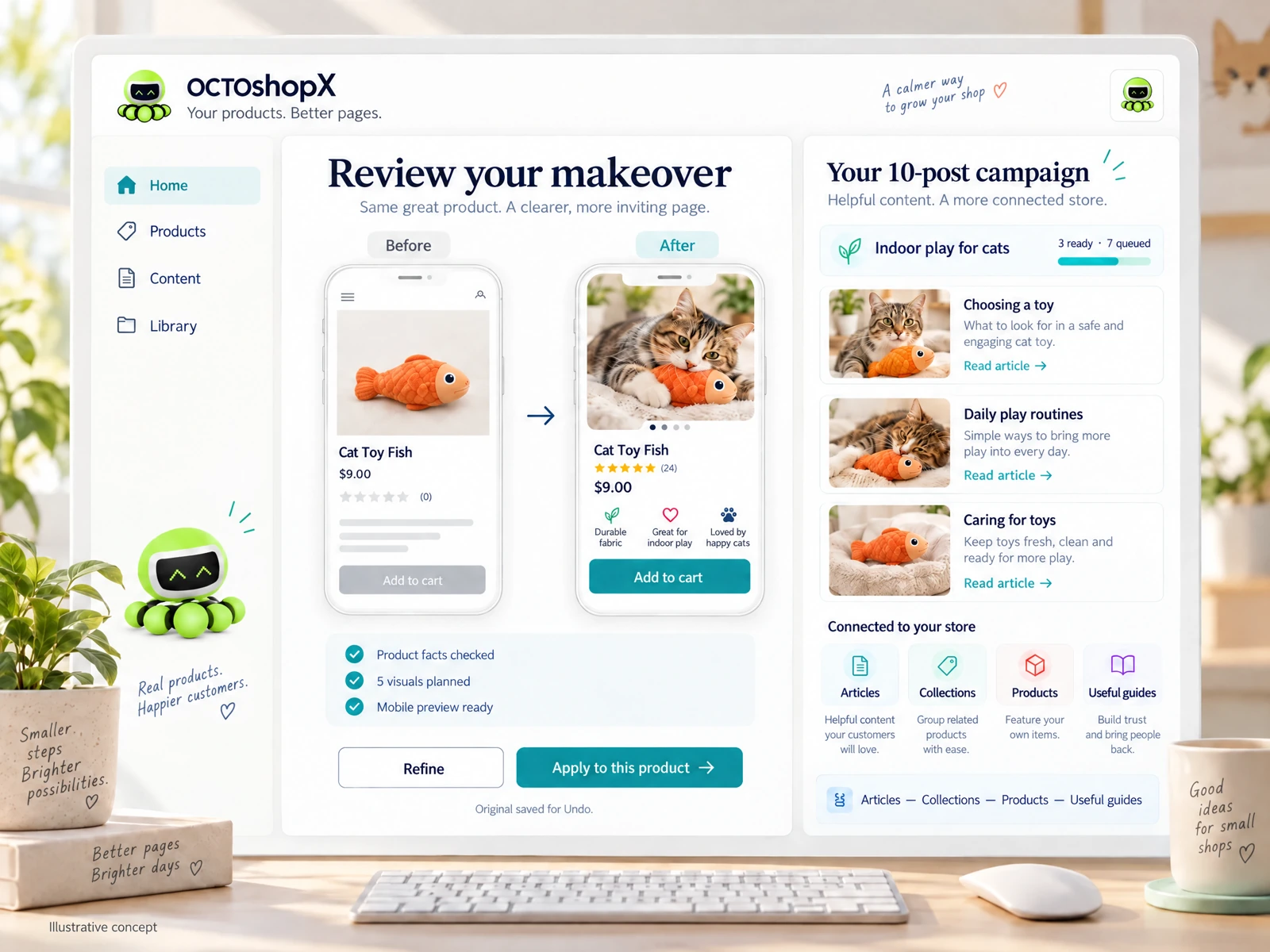
Practical workflow: product makeovers without code
Start with a small campaign—1–10 products. Prepare a short fact sheet for each product: materials, dimensions, use cases, and any claims you can verify. Use the no-code interface to feed those facts into the AI assistant and request targeted outputs like concise descriptions, short bullets, alt text and 5–10 visuals per page.
Review each output in preview mode before applying. Pay special attention to measurements, legal claims, and brand voice. Keep one original copy so you can Undo if the new content drifts from reality. This paced, human-in-the-loop approach protects your store and reduces returns or complaints from misleading content.
- Run small campaigns (1–10 items) to limit risk.
- Provide explicit product facts for accurate outputs.
- Always preview and keep the original for easy Undo.
Practical workflow: blogging and guides without code
AI can help draft up to ten blog posts per campaign to support product launches or seasonal content. Provide seed material—key points, links to relevant collections, and desired post length—and let the no-code studio generate outlines, drafts and suggested visuals. Use the built-in preview to check structure and internal links before publishing.
Edit drafts to add merchant-specific details, verify any product claims mentioned, and ensure internal links point to accurate collections or product pages. Remember that a generic connection does not automatically produce optimized internal linking or faithful visuals; curate those aspects manually so posts truly help conversions.
- Seed posts with clear goals and desired internal links.
- Edit drafts for merchant details and verified facts.
- Use visuals and internal links that support the product page.
Read the connected-content guide or explore product and blog specimens.
Practical checks and governance for no-code AI use
Create a short checklist that every AI-generated asset must pass: factual accuracy, correct specs, consistent voice, image fidelity, and working internal links. Assign a single reviewer responsible for final approval, especially for claims about safety, dimensions, or regulatory compliance.
Keep a log of campaigns and change history. If something goes wrong—incorrect measurements, misleading descriptions, or poor visuals—that history lets you revert quickly and learn what prompts or inputs led to the issue. A one-year support window on vendor tools can help resolve updates and fixes after your initial campaign.
- Use a five-point checklist: facts, specs, tone, visuals, links.
- Assign a reviewer and keep a campaign change log.
- Retain original assets so you can revert if needed.
Decision checklist: selecting the right no-code AI studio
Prioritize studios that offer campaign-based runs (1–10 products/pages, up to ten blog posts) and multiple visuals per page so you can see options before applying changes. Confirm they save originals for Undo, preview changes, and show how generated content links to Articles, Collections and Products.
Cost structure matters: one-time purchase with year-one updates and optional annual renewal is common for merchants who want permanence and predictable costs. Also check whether image budgets, optional AI plans and preview allowances match your expected volume of makeovers.
- Choose campaign-based studios with previews and Undo.
- Verify licensing: one-time core purchase plus optional renewal.
- Match image and AI plan budgets to your expected volume.
Can I connect AI to Shopify no code without changing live pages immediately?
Yes. Use tools that offer a preview environment and save originals. Run a campaign, review previews for each product or post, and only apply changes after approval. That way you can test outputs without altering live storefront content.
Will a no-code AI solution guarantee perfect visuals and layouts?
No single connection guarantees perfect results. Generators produce options that require human review for fidelity, layout consistency and effective internal linking. Plan to curate visuals and adjust layouts to match your brand.
How many products or posts should I update at once when using no-code AI?
Start small—1–10 products or pages—and up to ten blog posts per campaign. Small campaigns reduce risk, let you refine checks and prompts, and make it easier to revert changes if needed.
Install OCTOshopX. Give your store one clear job.
Use no-code AI to speed content, visuals and blog work but keep verification and editorial control front and center. Campaign-based makeovers with previews, saved originals and clear review steps are the most practical merchant approach. Install OCTOshopX.
A calm Shopify Product & Blog Studio: 5–10 useful visuals, connected articles and products, preview before publishing, and 1-Click Undo when needed.